IGNOU Admit Card Download: The Indira Gandhi National Open University (IGNOU) conducts Term-End Examinations (TEE) twice a year for its various degree, diploma, certificate, postgraduate, and doctoral programs. Every student appearing for the TEE must download the IGNOU Admit Card, also known as the IGNOU Hall Ticket. This admit card is a crucial document that grants entry into the examination hall and ensures a smooth and authenticated exam process.
Downloading the IGNOU admit card is mandatory for all candidates appearing for the examinations. It contains essential information such as the exam center address, exam date, timing, subject codes, enrollment number, and exam-day instructions. Without the admit card, students will not be allowed to write the examination.
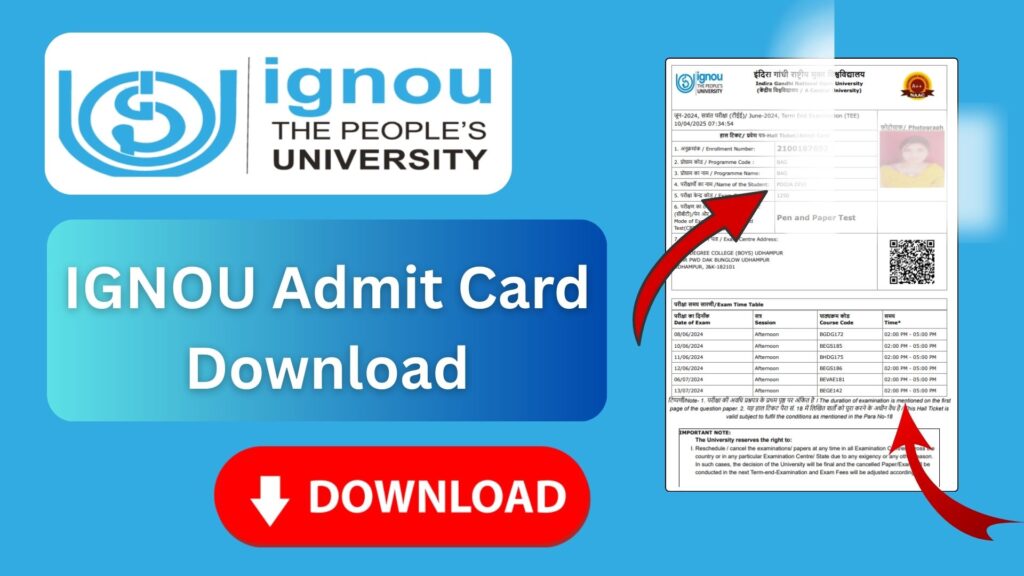
This article explains in detail how to download IGNOU admit card, the importance of the hall ticket, step-by-step instructions, key guidelines, troubleshooting solutions, and all the information students need. Whether you are appearing for the June or December TEE, this complete guide will help you understand the entire process clearly.
What Is the IGNOU Admit Card?
The IGNOU Admit Card is an official examination document issued by the university for students registered to take the Term-End Examinations. The admit card serves as verification that the student is eligible to sit for the exam. It contains the student’s details, academic program, exam center details, and examination schedule.
IGNOU releases separate admit cards for:
- Term-End Theory Examinations
- Practical/Project/Assignment Viva Examinations
Students must download and print the admit card and carry it to the exam center.
IGNOU Admit Card Download Link
Students can download their admit card from the official IGNOU Samarth portal using this link:
Official IGNOU Admit Card Download Link:
https://ignou.samarth.edu.in/index.php/site/login
This link works for both June and December TEE sessions.
Why Is the IGNOU Admit Card Important?
The admit card is essential for several reasons:
1. Mandatory for Entry
Students cannot enter the examination hall without a valid admit card issued by IGNOU.
2. Contains Exam Schedule
The admit card lists the date and time of each exam paper.
3. Provides Exam Centre Details
It specifies the exact exam center location allocated to the student.
4. Confirms Identity
The admit card acts as proof that the student is enrolled in the program and eligible for the exams.
5. Helps Avoid Confusion
It prevents errors by clearly mentioning subject codes, session timing, and important exam-day guidelines.
Details Mentioned on the IGNOU Admit Card
The IGNOU admit card typically includes the following information:
- Student’s Name
- Enrollment Number
- Program Code (BA, BCOM, BCA, MA, MBA, etc.)
- Course Codes
- Examination Centre Address
- Exam Date and Session
- Photographs (sometimes)
- Instructions for the Candidates
- Session Type (Morning/Evening)
- Hall Ticket Number
Students must carefully check all details after downloading the admit card. If there are discrepancies, they should contact their regional center immediately.
IGNOU Admit Card Release Timeline
The IGNOU admit card is usually released:
- 2–3 weeks before the exam starts for December TEE
- 2–3 weeks before the exam for June TEE
Students should keep checking the official portal to avoid missing the release date.
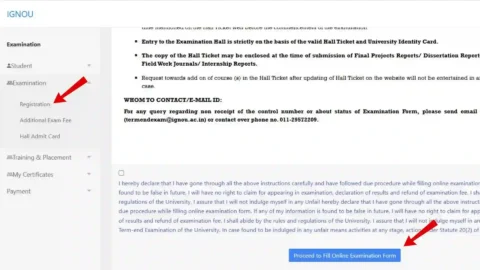
How to Download IGNOU Admit Card? Step-by-Step Guide
Follow the steps below to download your IGNOU TEE hall ticket:
Step 1: Visit the Official Admit Card Portal
Go to the official download link:
https://ignou.samarth.edu.in/index.php/site/login
Step 2: Log In Using Credentials
Enter:
- Enrollment number
- Password
- Captcha code
If you have never logged in before, click on the New Registration option to create an account.
Step 3: Select the Examination Session
Choose:
- June Term-End Examination
or - December Term-End Examination
Step 4: Download the Admit Card
After login, you will see the admit card download option. Click on the download button.
Step 5: Print the Admit Card
Download and print multiple copies for safety.
What to Check After Downloading the Admit Card?
Students must verify the following details:
- Name spelling
- Enrollment Number
- Program and Course Codes
- Exam Date and Time
- Exam Center Code and Address
- Photograph (if applicable)
- Signature (if printed)
- Exam instructions
If any error is found, contact your Regional Centre for correction.
What to Do If You Cannot Download Your IGNOU Admit Card?
Students sometimes face problems when downloading the admit card. Below are common issues and solutions:
1. Website Not Loading
During peak time, the server may slow down. Try again after some time.
2. Wrong Enrollment Number
Double-check your enrollment number. Even a small error will prevent download.
3. Admit Card Not Available Yet
If the university has not released the admit card, you will not be able to access it.
4. Account Login Error
If your password is incorrect, use the Forgot Password option.
5. Missing Photo or Signature
Some admit cards may not show photos. Carry a valid photo ID (Aadhaar or college ID) to the examination center.
6. Not Eligible for Exam
Ensure that:
- You submitted your exam form, and
- You have completed all assignment submissions
Only then will your admit card be generated.
IGNOU Exam Day Instructions
The admit card contains several important exam-day rules. Some of the most important are:
1. Carry Printed Admit Card
Digital copies are not accepted. Only printed copies are allowed.
2. Bring a Valid Photo ID
Acceptable IDs include:
- Aadhaar Card
- PAN Card
- Passport
- Driving License
- Student ID
3. Reach Early
Reach the exam center at least 30 minutes before the exam starts.
4. Follow the Seating Plan
Seating arrangements will be posted on notice boards at the center.
5. No Electronic Devices
Mobile phones, smartwatches, calculators (unless allowed), or other electronic gadgets are strictly prohibited.
6. Carry Only Allowed Materials
Bring only pens, pencils, and permitted stationery.
7. Follow Invigilator Instructions
Listen carefully to the instructions provided by the exam staff.
IGNOU Practical Exam Admit Card
Some programs such as BCA, MCA, Diploma in Engineering, and certain science courses require practical exams. IGNOU issues separate admit cards for practical exams, which are also downloaded from the same portal.
Students must check:
- Practical schedule
- Practical location
- Batch timing
Practical admit cards are equally important.
IGNOU Revaluation and Duplicate Admit Card
Revaluation
After the exam, if a student is unsatisfied with their marks, they can apply for revaluation. The admit card must be preserved until the revaluation process ends.
Duplicate Admit Card
If you lose your admit card:
- Re-download it from the portal
- Take multiple copies next time
IGNOU does not charge extra for re-downloading the admit card.
Important Links and Information
| Category | Details / Link |
|---|---|
| IGNOU Admit Card Download Link | https://ignou.samarth.edu.in/index.php/site/login |
| Exam Sessions | June TEE, December TEE |
| Admit Card Release Time | 2–3 weeks before the exam |
| Document Required | Enrollment Number, Password |
| ID Required on Exam Day | Aadhaar, PAN, Passport, Driving License, Student ID |
| Exam Conducting Authority | Indira Gandhi National Open University |
| Practical Admit Card | Available separately on the same portal |
| Minimum Requirements | Submitted exam form and assignments |
| Help | Contact your Regional Centre |
FAQ about IGNOU Admit Card Download
When will IGNOU release the admit card?
The admit card is usually released 2–3 weeks before the examination begins.
What is the official link to download the admit card?
The official link is: https://ignou.samarth.edu.in/index.php/site/login
Can I appear for the exam without an admit card?
No. Students must bring a printed copy of the admit card to the exam center.
What should I do if my photo is missing on my admit card?
You must carry a valid government-issued photo ID along with the admit card.
I forgot my password. How can I download the admit card?
Use the Forgot Password option on the portal.
Can I change my exam center after admit card release?
No. Exam center changes are not allowed after the hall ticket is issued.
My exam form is submitted, but my admit card is not available. Why?
Possible reasons:
You have not submitted assignments
You have dues pending
IGNOU has not released the admit card yet
Server delay
Do I need to carry any documents along with the admit card?
Yes. You must carry:
Printed Admit Card
A valid Photo ID
Are separate admit cards issued for practical exams?
Yes. Practical exams have separate admit cards.
Can international students download the admit card from the same link?
Yes. The portal is accessible globally.
Conclusion
The IGNOU Admit Card is a vital document for every student appearing in the Term-End Examinations. Whether you are preparing for the June or December TEE, downloading and printing the admit card on time is essential. It ensures that you have all the necessary details regarding your exam schedule, location, and examination guidelines.
Students should carefully review all the information printed on the admit card and follow the instructions provided by IGNOU for a smooth exam experience. If you face any issues during download, the solutions listed in this article can help you resolve them. Remember to preserve the admit card safely even after the exams, as it may be required for future processes like revaluation or verification.
By following the steps and guidelines mentioned in this comprehensive guide, students can easily download their IGNOU admit card and prepare confidently for their exams.